How Do Voice Assistants Work for Kids? A Parent's Plain-English Guide
• KidTalk Team
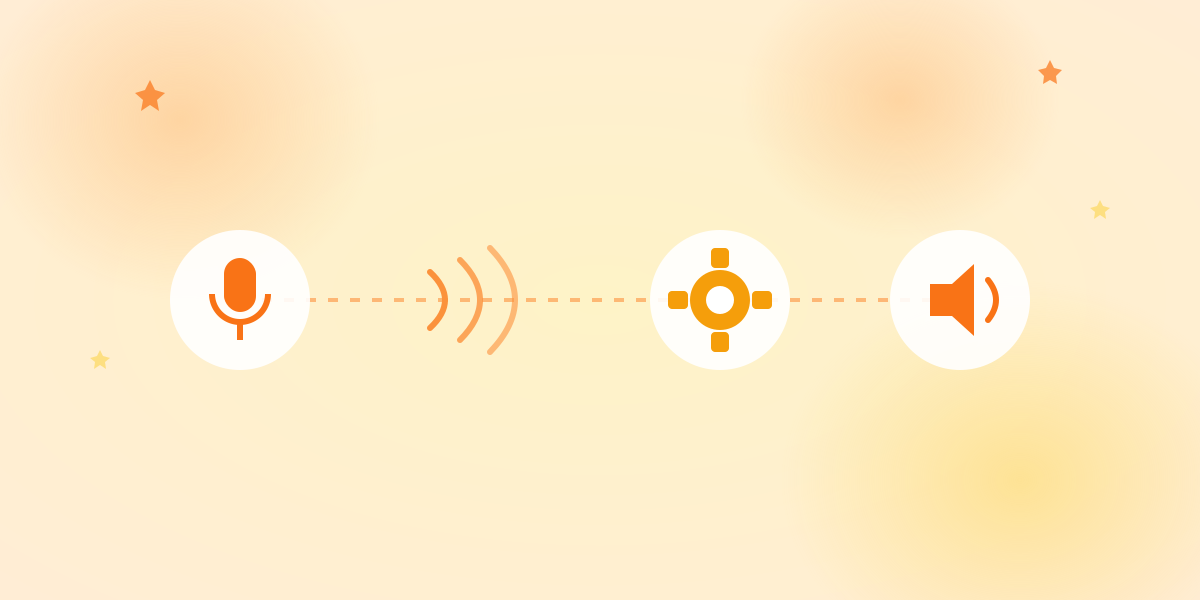
Short answer: When a child speaks to a voice assistant, four things happen in about a second. The device records their voice, converts that audio into text, sends the text to an AI that writes a reply, and then reads the reply back aloud. The child only ever talks and listens — the reading, thinking, and speaking-back all happen invisibly behind the scenes.
If you’ve watched your child chat with a voice AI and wondered “what is actually going on in there?”, this guide walks through the whole journey step by step, in plain language.
The Four Steps, Start to Finish
Every voice conversation — whether it’s with KidTalk, a smart speaker, or a phone assistant — follows the same basic path. (For how a kids’ AI speaker differs from the Alexa you may already own, see our comparison.)
1. Listening (recording the voice). When your child taps the button and speaks, the device’s microphone captures the sound of their voice and saves it as a short audio clip. Nothing is understood yet at this stage; it’s just a recording, the same way a voice memo works.
2. Speech-to-text (turning sound into words). The audio clip is sent to a speech recognition system. Its only job is to figure out which words were spoken and write them down as text. “Why do birds fly?” becomes the typed sentence Why do birds fly?. This is the step that has to cope with small voices, missing sounds, and words that aren’t quite finished — which is why AI built for children is tuned differently from AI built for adults.
3. Thinking (the AI writes a reply). The text question is handed to a language model — the “brain” of the system. It reads the question and composes an answer. In a well-designed kids’ product, this is also where the reply is kept short, gentle, and age-appropriate, and where anything unsafe is filtered out before it’s ever spoken.
4. Speaking (text-to-speech). Finally, the written answer is converted back into a natural-sounding voice and played out loud. This is called text-to-speech. Your child hears a friendly voice reply — and never sees a single line of text.
The remarkable part is that all four steps usually finish in about a second, so to your child it feels like one smooth, natural conversation.
A Simple Analogy
Think of it like passing a note through a helpful translator:
- Your child speaks their question (step 1).
- A translator writes it down so it can be read (step 2).
- A wise friend reads the note and writes an answer (step 3).
- The translator reads that answer out loud back to your child (step 4).
Your child never has to read or write anything. They just talk to a friend and get a spoken reply.
Why “For Kids” Changes the Design
A voice assistant built for adults and one built for children look similar on the surface, but the engineering choices underneath are very different.
Recognizing young voices is harder. Children speak more quietly, mispronounce words, and often trail off. Speech recognition has to be far more forgiving. A kid-focused system expects this and is tuned to understand imperfect, developing speech.
The reply has to be age-appropriate. A general assistant might answer “Why is the sky blue?” with a paragraph about wavelengths and Rayleigh scattering. A children’s assistant gives a short, warm, understandable answer — and knows when to gently redirect a question that isn’t suitable for a young child.
Safety is built into the “thinking” step. In a product designed for children, the AI is guided by rules about what it can and can’t say, so unsafe or scary content is filtered out before it ever reaches the speaker. This is the single biggest difference between a general chatbot and a kids’ companion. (We wrote more about that in our post comparing KidTalk and general chatbots.)
Turns are kept short. Many kids’ voice tools cap each recording to a few seconds. That’s not a limitation — it matches how young children naturally communicate, in short bursts rather than long monologues.
Is It Always Listening?
This is the question parents ask most, so let’s be clear.
A well-designed kids’ voice app records only when the child (or parent) presses a button to talk — it is not passively listening in the background waiting for a wake word. When the recording finishes, that short clip is processed to produce a reply. Reputable products don’t store your child’s voice to build advertising profiles.
Smart speakers work a little differently: they listen for a “wake word” and then start recording. If that concerns you, look for products with an explicit press-to-talk design and a clear privacy policy that explains what is kept and for how long. (Our own approach is described on our privacy page.)
How KidTalk Does It
KidTalk follows exactly the four steps above, tuned end to end for young children:
- Your child taps one button and speaks — up to about ten seconds.
- Speech recognition turns their words into text, tuned to understand small, developing voices in Japanese or English.
- The AI composes a short, friendly, age-appropriate reply, guided by safety rules so nothing unsuitable gets through.
- The answer is spoken back in a warm voice — no reading required.
The whole loop happens in about a second, so a child who can’t read a single word can still have a real back-and-forth conversation about dinosaurs, the moon, or why the dog is barking.
Frequently Asked Questions
Does my child need to be able to read to use a voice assistant? No. The entire point of voice-first design is that the child only speaks and listens. Reading and typing happen invisibly inside the system, not for the child. (More on this in Why Voice-First AI Is Perfect for Children Who Can’t Read Yet.)
Where does the AI’s answer come from? From a language model — an AI trained on a very large amount of text that lets it compose a relevant reply. In a kids’ product, that reply is shaped by safety rules and an age-appropriate style before it is spoken.
How long does the whole process take? Usually about a second. The recording, speech-to-text, AI reply, and text-to-speech all happen quickly enough to feel like a normal conversation.
Is my child’s voice stored? It depends on the product — always check the privacy policy. A trustworthy kids’ app processes the clip to generate a reply and does not use your child’s voice for advertising. Look for press-to-talk (not always-on) designs.
The Takeaway
A voice assistant isn’t magic — it’s four sensible steps: listen, transcribe, think, speak. What makes one right for children isn’t the technology itself but the care taken at each step: understanding small voices, keeping answers age-appropriate, and building safety into the thinking. When those choices are made well, a young child gets something genuinely valuable — a conversation partner they can use entirely on their own, using nothing but their voice.
Ready to try KidTalk?
Turn your child's curiosity into stories with safe, friendly AI.
Get started for free