What Age Should Kids Start Typing? When Schools Teach It, Age-by-Age Goals, and How to Practise at Home
• KidTalk Team
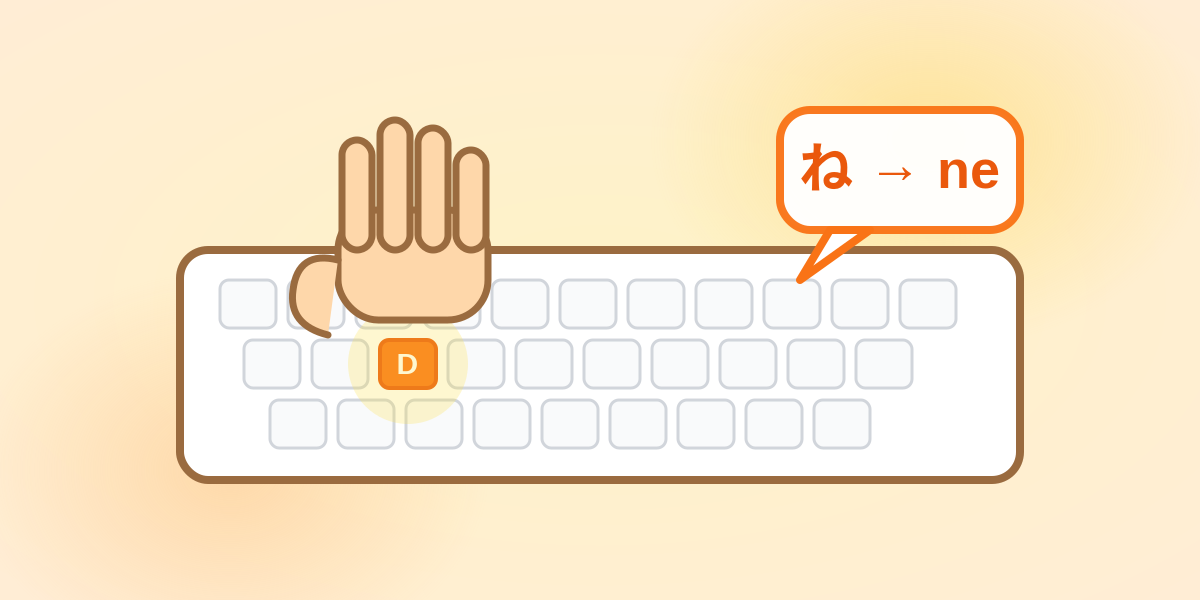
Short answer: Japanese schools start keyboard typing in earnest in grade 3, when children learn romaji in Japanese class and begin entering text on their school tablets. Before that, typing works as a “find the key” game rather than writing, and that works from grade 1. This post covers when schools teach it, what to aim for at each age, whether to teach si or shi, and habits that make home practice last. At the end, a word about the free typing practice tool we built.
For families outside Japan, the timing is similar: most curricula introduce keyboarding around ages eight to nine, and the stages below map onto that.
What schools teach, and when
- Grades 1–2: children get a school device and mostly tap and drag. Text entry, where it exists, is an on-screen kana keyboard
- Grade 3: romaji is taught in Japanese class, and most schools begin keyboard romaji input at the same time. The national curriculum places “entering text with a keyboard” at grade 3 and up
- Grades 4–6: research projects and presentations make typing speed matter for learning. Children don’t need touch-typing by then, but “typing without hunting” makes everything easier
In other words, romaji input can’t start before romaji is understood. Starting in grades 1–2 means changing the goal.
Age-by-age goals
Grades 1–2: find the key
One letter at a time. For ねこ, find and press n, e, k, o. The child doesn’t need to understand how romaji works; this is the stage of learning with the body that “this letter lives here.” Thirty seconds for one word is completely fine. The point is the experience of searching for a letter by eye, not speed.
Grades 3–4: short sentences in romaji
Once romaji has been taught at school, type short sentences, something like “ねこが ひなたで ねている。”, with a doubled consonant (っ), an ん, and a y-sound (きゃ) in them. Those three cause about eighty percent of romaji-input stumbles.
Grades 5–6: kanji sentences and punctuation
Sentences like 「図書館で借りた本を、週末に読み終えた。」 typed by their reading. The comma key for 、 and the period for 。. This is also not too late to start thinking about home-row finger placement.
si or shi: which to teach?
Textbooks use kunrei romaji (si, ti, tu, hu); most computer and phone guides use Hepburn (shi, chi, tsu, fu). Parents worry about this, and the answer is “either, and mixing is fine.”
Romaji input on a computer accepts both. し becomes し whether you type si or shi. If a child learned si at school, let them type si; Hepburn arrives on its own later. The reverse, trying to force one system, is what confuses children.
The same goes for ん as a single n or nn, and っ as a doubled consonant or xtu: whichever is easier for the child. Telling them up front that several answers are correct removes the fear of being marked wrong.
Habits that make home practice last
- One set a day, five minutes. A set is about ten sentences. Seeing the end keeps children going, the same idea as the ten-minute daily routine
- Don’t measure speed. Speed rankings are close to counterproductive in elementary school. Three numbers are enough: sentences typed, misses, days in a row
- Don’t stop on mistakes. A wrong key turns red; the right key moves on. Resetting the whole sentence resets the child’s motivation with it
- Check with sound. Hear the sentence before typing, hear it after. Linking letters to sound helps reading too
- Use the school device if you can. A school tablet brought home is actually well suited to typing practice: there is nowhere for it to drift into games
About the tool we built
We added free typing practice to the KidTalk site. No login, runs in the browser.
- Three levels × nine themes (animals, food, school, seasons, greetings, body, vehicles, home, family), thirty items each. A run picks ten (fifteen at level 1), unseen ones first. Grades 1–2 get single words, grades 3–4 short sentences, grades 5–6 kanji sentences
- Tap a sentence and Poppy reads it. The audio is pre-rendered, so the only network use is the first load
- si or shi both count, as do nn or n and doubled consonants
- A wrong letter turns red and the right key moves on. No speed rankings
- Records stay on this device. Nothing you type is sent to a server
- English sets at the same three levels, with “same set in English” links back and forth. The Japanese sets with romaji and audio also suit learners of Japanese
It doesn’t use the microphone, so school-device restrictions rarely get in the way. We’ll add lessons over time; if there’s a theme you want, tell us via contact.
Frequently asked questions
Kana input or romaji input? Schools use romaji input. Kana input uses more keys and doesn’t carry over to English typing. Unless there’s a specific reason, romaji.
When should home-row finger placement start? Once the child can type without hunting, around grades 3–4. Tying fingers down from the start trips them up at the key-finding stage. The practice tool only shows, in small text, which finger presses the next key.
Does an on-screen tablet keyboard count as practice? It helps with learning where keys are, but the finger movement is different from a physical keyboard. If the school device has a keyboard, that’s the shortest path.
What about competitive typing games? Fine for older children who enjoy them. For younger ones, “mistakes are okay” comes before speed.
Summary
- Romaji typing starts at school in grade 3; grades 1–2 play “find the key”
- The three stumbles are っ, ん and きゃ; si and shi both count, and mixing is fine
- One five-minute set a day, no speed measuring, no stopping on mistakes, check with sound
- We built a free tool: audio, no login, records on-device only
Typing is a child’s first tool for turning their own words into their own letters. Speed follows. What’s worth growing first is the feeling that “if I type it, it gets through.”
Ready to try KidTalk?
Turn your child's curiosity into stories with safe, friendly AI.
Get started for freeRelated Articles
November 16, 2026
Addition and Subtraction: What Age? Within 10 at 5–6, Carrying in First Grade, and Why Counting on Fingers Is Fine
November 16, 2026
Kanji: what age? 80 in grade 1, reading before writing, and stroke order you trace rather than memorise
November 15, 2026